 Main:
Main: 
Windows Server 2016 reaches the end of Microsoft's extended support on January 12, 2027. After that, it stops receiving security patches, bug fixes, and technical support. The server keeps running, but new vulnerabilities discovered after that date are never patched — which creates compliance risk (HIPAA, PCI DSS) and can jeopardize cyber insurance coverage if a breach occurs on an unsupported system. This matters most for practices running on-premise practice management systems (classic Dentrix, Eaglesoft, self-hosted Open Dental, etc.).
Quick question: do you know where your server is?
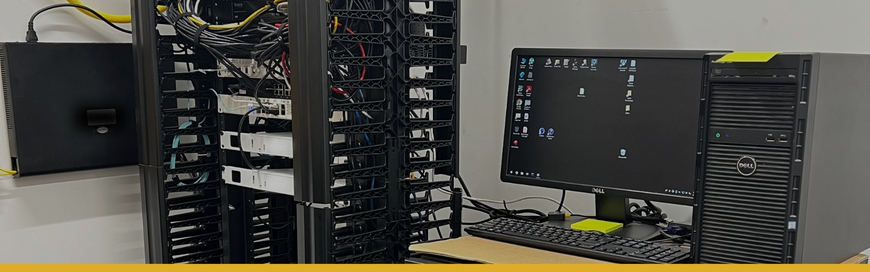
Not a trick question. In a lot of dental practices, the server lives in a closet, a back room, or tucked under a desk somewhere… running the practice management database, storing the imaging archive, and handling logins for the whole office. It probably never gets looked at or thought about by anyone in the office, unless something arises.
That's exactly why this deadline is the one most likely to sneak up on you.
What's Happening?
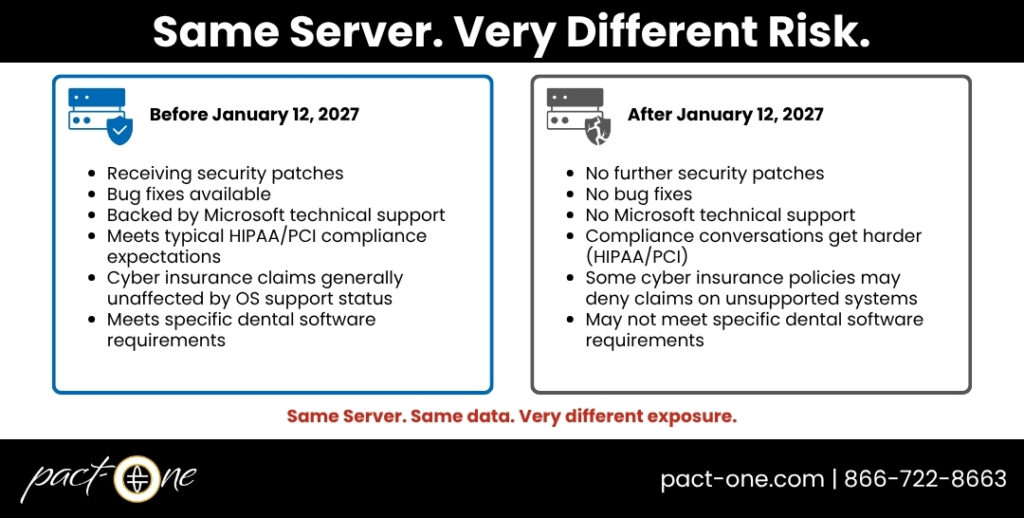
Microsoft has confirmed that extended support for Windows Server 2016 ends on January 12, 2027. After that date, it stops receiving security updates, bug fixes, and technical support permanently, under the standard lifecycle.
Windows Server 2016 will keep running that day. It won't shut itself off. But it will stop getting the patches that close newly discovered vulnerabilities, and that gap only grows wider every month after the deadline passes.
Why a Server Deadline is Different from a Desktop Deadline
When a single workstation falls behind on updates, it’s a contained problem. A server is different. It’s the one thing everything else in your office depends on. If it’s the device holding your patient records, imaging archive, and domain logins, it becomes a single point of failure sitting underneath your entire practice.
Here’s the part that turns this from an IT concern into a business one:
- Compliance risk. HIPAA and, if you take card payments, PCI DSS both generally expect that systems handling sensitive data are supported and patched. Running an end-of-life server can complicate things at exactly the moment you'd least want complications… during an audit or after an incident.
- Insurance risk. This is the one that catches people off guard. A growing number of cyber insurance policies include language that can deny a claim outright if a breach happens on a system that was past its official end-of-support date. That turns an abstract IT risk into a very concrete financial one.
The Hidden Dependency: SQL Server 2016
If your practice management software runs on a database, there's a good chance that database is SQL Server. And if it's the 2016 version, it already has its own end-of-support date behind it: SQL Server 2016 reached the end of extended support on July 14, 2026, ahead of the server operating system itself. A paid Extended Security Updates option exists, but its pricing escalates sharply each additional year, making it a short-term bridge at best, not a plan. It's easy to fix the operating system and forget the database sitting on top of it, so this is worth checking specifically, not assuming.
We track vendor- and version-specific dependencies like this on our Technical Alerts page as they come up. Feel free to periodically check it out alongside anything you're doing to prep for January 2027.
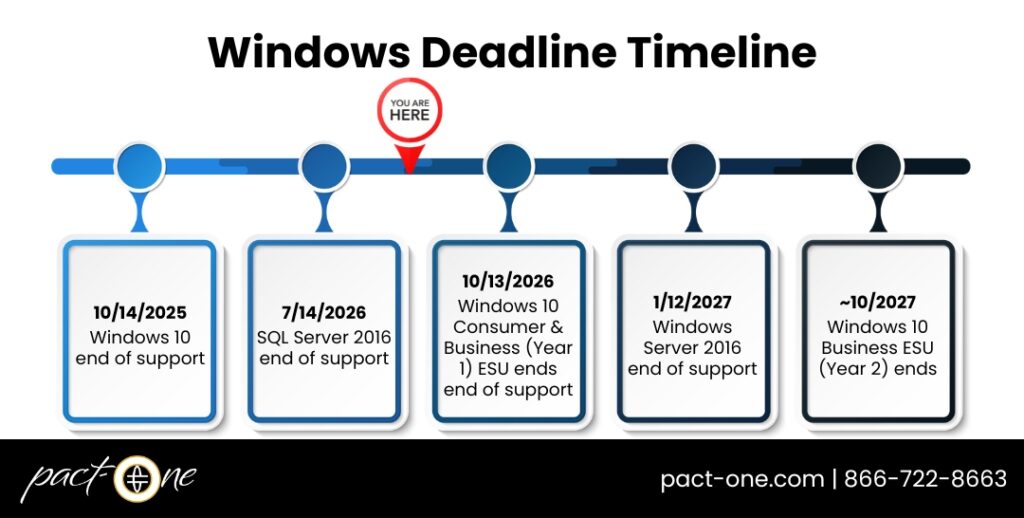
This server deadline doesn’t exist in isolation. It’s one part of a wider stack of dates hitting dental practices in 2025-2027. If your desktops and operatory computers haven’t been addressed yet either, our Windows 10 to 11 status guide covers that half of the picture.
For Multi-Location and DSO Practices, the Stakes are Higher
If you're running a single office, an unpatched server is a serious problem contained to one location. If you're managing multiple locations or operating as a DSO, the math changes.
Dentrix Enterprise, the version built specifically for multi-location groups, centralizes everything into one SQL Server database serving every site. That's a real operational advantage day to day: one login, one dataset, consistent reporting across locations. It also means a single unpatched, end-of-life server is a shared risk for every location connected to the infrastructure. The blast radius scales with your practice, not with your server count.
This also matters if growth is on your roadmap in a different way: acquiring a practice, or being evaluated for acquisition, should include a server lifecycle check as a standard due-diligence item. An inherited on-premise server running an end-of-life OS is exactly the kind of thing that surfaces after close if nobody thought to ask. If standardizing IT infrastructure across locations is part of your growth plan, this deadline is a natural point to fold that conversation in rather than treating it as a separate project later.
Your Path Forward
There's no single right answer here. It depends on what that server is doing for you. Broadly, practices have three options:
- Upgrade in place to a current Windows Server release.
- Migrate to a cloud-native setup. For some practices, this means moving general infrastructure to Azure, for others, it means the practice management system itself moves to a cloud-native platform (Dentrix Ascend, Curve Dental, Denticon, etc.), which removes the on-premises server question for that workload entirely rather than just delaying it.
- A hybrid approach of keeping some services local and moving others to the cloud, often the right call for practices with specific legacy software tied to on-site hardware.
For the full replacement and budgeting process — timelines, what to prioritize, how to sequence it — our Dental Practice Hardware Refresh Plan and Guide to Replacing Tech in Your Dental Practice This Year walk through it step by step.
Staying on Server 2016 past January 2027 and hoping for the best is not a viable plan. Server-side Extended Security Updates exist, but Microsoft itself frames them as a short, expensive bridge… not a long-term plan.
January 2027 is Right Around the Corner
Five months feels like a long runway. It isn't, once you consider what a server migration involves:
- Assessing what's running
- Planning a migration path
- Testing that your practice management and imaging software behave correctly in the new environment
- Scheduling downtime that doesn't land in the middle of your busiest week
It's the kind of work that benefits enormously from starting early and loses almost everything if it gets compressed into a scramble. (For a sense of what's at stake when infrastructure fails without a plan, see Dental Practice Business Continuity: How to Keep Seeing Patients During an IT Outage.)
What "Patient Records Server" Means in Your Office
It's worth being specific about what's riding on this one device:
- Your practice management database — patient charts, treatment history, scheduling
- Your imaging archive — X-rays and scans from systems like DEXIS, Carestream, Planmeca Romexis, or i-CAT, which often store to the same server inftrastructure
- Domain and login credentials for staff across the practice
- Frequently, the backup and recovery process itself runs through this same infrastructure (see Accidentally Deleted a Patient File at Your Dental Practice? Here's What to Do Next for what a gap here looks like in practice)
FAQs about Windows Server 2016
Here are some common questions related to on-premise server for dental practices. Click the question to see the answer below.
Does Windows Server 2016 end of life affect cloud-based systems like Dentrix Ascend or Curve Dental?
Let's Take a Look Under the Hood
You don't have to figure out on your own whether your server is a five-minute fix or a larger project. Whether you’re a single office, managing several locations, or evaluating a practice you’re about to acquire, we can help!
Curious what's running in your server room? Request a free Practice IT Analysis and we'll tell you what's at risk, what your realistic options are, and what a sensible timeline looks like for a practice your size.
Related Resources
- Guide to Replacing Tech in Your Dental Practice this Year
- Dental Practice Hardware Refresh Plan: When to Replace Computers, Server, and Network Hardware
- The Risks of End-of-Life (EOL) Technology in Your Dental Practice
- Upgrading Your Dental IT Infrastructure: Is It Time?
Dental IT. Remove the Burden. Embrace the Use.
Quality patient care – it's ultimately why you became a dental professional. But, some business operations can get in the way (such as pesky computer issues or lack of IT support). That’s where Pact-One Solutions can help! Our passion lies in supplying reliable, responsive dental IT support and security that practices can count on.
Whether you’re looking for dental IT services for your startup or searching for more responsive dental IT support – our team of dental IT specialists have you covered. With team members throughout the United States, we offer nationwide support to dental practices of all sizes, specialties, and stages of growth. Our wide range of dental IT services ensure your data is secure, accessible, and protected.
Don't let technology challenges hinder your ability to deliver exceptional dental care. Contact us at info@pact-one.com or 866-722-8663 to join over 3,000 dental professionals thriving with the support of a dedicated dental IT team.


You must be logged in to post a comment.