 Main:


Last Updated: November 2026
It was a normal Thursday morning. Patients were checking in. Then, at about 8:17 a.m. Pacific on November 12, dental practices using Microsoft 365 started seeing email failures, as our Technical Alerts page logged in real time.
For many practices, referral emails stalled. Insurance replies didn’t land. Lab messages sat in limbo. And a lot of front desks asked the same question: “Now what?”
The outage itself wasn’t the real story. It was a stress test, and it came with a hidden message: An outage is not a surprise. Having no plan for it is.
That message is called business continuity, and it’s what this post is about. You’ll walk away with a clear view of what happened, a simple plan for the next time email goes dark (any provider, not just Microsoft), a way to spot the scams that follow outages, and a list of what’s in your control.
What happened in the Microsoft 365 outage?
Microsoft 365 email, led by Exchange Online and Outlook, failed worldwide on November 12, 2026, and took about a day to recover. Microsoft says the cause was a technical fault tied to a network upgrade, not a cyberattack.
| Question | What we know |
|---|---|
| When did it start? | We received notice around 8:17 a.m. Pacific on November 12 |
| What was hit? | Exchange Online and Outlook first, then Teams, SharePoint Online, Copilot and Defender [1] |
| How big was it? | A peak of 48,124 Downdetector reports from U.S. users on November 12 [7] |
| What caused it? | A problem introduced during an earlier network capacity upgrade that surfaced after a recent network change [4] |
| Was it a cyberattack? | No. Microsoft said it was a technical issue not related to cyber activity or AI agents [2] |
| Is it over? | Yes. Microsoft finished its fix and restored the last affected customers as stated in an X post on 11/13/26 [6] |
What is business continuity for a dental practice?
Business continuity is your plan for keeping patients seen, the schedule running, and the team calm when a system you rely on goes down (whether that is email, your practice management software, or an internet outage). It answers three questions ahead of time:
- Who does what?
- How do we communicate?
- Who do we call?
Backup and disaster recovery protects your data. Continuity protects your day. And, you need both.
Quick self-check: how did your practice do during the outage?
If your team scrambled, guessed, or just waited, that’s your answer. You don’t have a working continuity plan for email yet. That’s common, and it’s fixable. The goal is to keep your practice moving during an outage.
Walk through the outage day. This is a great way to see how well your practice did and make improvements for next time.
| Did this happen on outage day? | If the answer was "no", do this |
|---|---|
| Your team knew within minutes that the problem was on Microsoft’s side, not your office | Name one person to check Technical Alerts or call your IT provider first |
| One person owned patient communication | Pick a backup owner now and write down their role |
| You had a second way to reach patients, labs, and referring offices | List phone numbers and portals you can use when email is down |
| You could see tomorrow’s schedule without email | Confirm your practice management software and schedule work without it |
| Staff knew how to contact IT support | Print out “how to contact IT support” and post it at the front desk |
| Nobody moved patient information to personal email | Set a clear rule. Personal email can create HIPAA risk |
If you checked more “no” than “yes,” take a breath. You’re in good company, and the next section gives you a plan.
What should a dental practice do when email is down?
Switch to your backup plan, starting with the phone. Confirm the problem is your provider’s, name one person to run communication, and use pre-approved channels instead of improvising. This works whether you use Microsoft, Google, or anything else. Email outages don’t just affect Microsoft; it could happen to any email provider.
A simple three-step email-down plan
- Confirm it’s them, not you. Check your provider’s status page or Technical Alerts, or call your IT provider. Don’t reset passwords or reinstall your email application. Those won’t fix a problem on the email provider’s side and can create new headaches.
- Move to your backup channels. Your communication lead uses the table below. Keep patient details out of personal email and unapproved apps.
- Catch up and review. When email returns, work through the backlog in priority order. Then spend 15 minutes noting what worked and what didn’t.
Who needs to hear from you, and how?
Decide these answers now and write them down.
| Who | Backup channel to set up ahead of time |
|---|---|
| Patients | Phone, your approved patient-messaging tool, a voicemail greeting and a website banner |
| Dental lab | Phone call to your lab contact, or the lab’s own portal |
| Referring and specialist offices | Phone, or their secure referral portal |
| Insurance carriers | Carrier portals and phone lines |
| Your team | A printed phone tree with one named lead. No patient details in group texts. |
Not sure which tools meet your HIPAA needs? Ask your compliance advisor before you need the answer, not during an outage.
How do scammers take advantage of outages like this one?
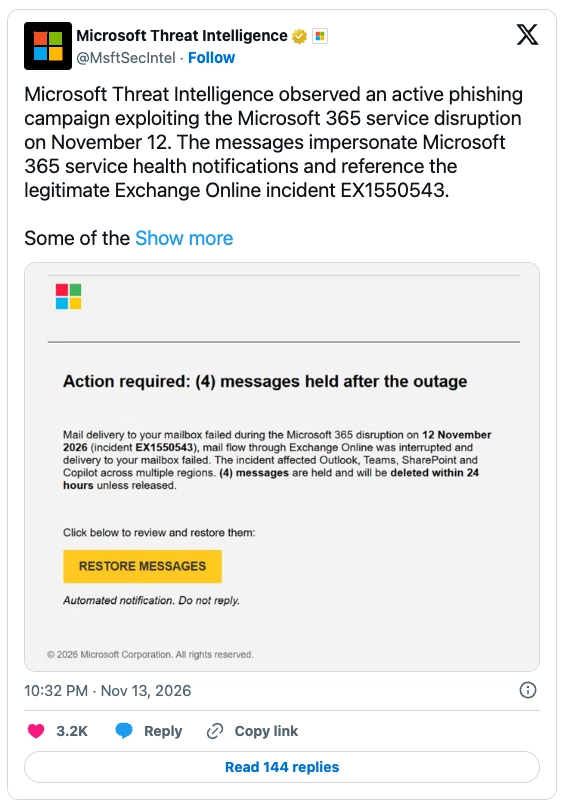
They send fake “recovery” and “refund” messages while everyone is stressed and watching their inbox. Within two days of this outage, Microsoft Threat Intelligence warned of a live phishing campaign. The emails looked like official service health notices and even cited the real incident number. That’s what makes them dangerous.
What did the outage scam emails look like?
Microsoft’s warning, via Microsoft Threat Intelligence on X, described emails that claimed messages held during the outage would be deleted within 24 hours unless you clicked to restore them. Subject lines followed the pattern “Outage – [six-character code].” The links bounced through a tracking service to an outside website. Microsoft called the activity consistent with credential phishing, which means stealing sign-in details. It has not confirmed that passwords were actually taken.
Fake refund emails are a second wave to expect. Eric Hulse of Command Zero told Kiplinger that “fraudsters build a fake version of whatever people want next: a way back in, a way to reach support, or compensation.” Treat any message promising an outage refund as a scam until you’ve verified it another way.
Red flags to teach your whole team
| Red flag | What to do instead |
|---|---|
| A deadline: “Click within 24 hours or lose your messages” | Stop. Real fixes don’t hide behind a countdown. Report it to your IT provider. |
| A real incident number inside the email | Don’t treat it as proof. Scammers copy real details to look real |
| A “restore your inbox” or “re-verify your account” link | Skip the link. Confirm the outage status in your admin center or ask your IT provider |
| A refund offer by email, text, or phone | Ignore it. Don’t click, call or share payment details, and ask your IT provider |
| A vendor or lab saying “our email is down, send payment to a new account” | Call them on a number you already have before sending any money |
| Anyone contacting you first about the outage | Treat it as a scam until you’ve verified it another way |
If someone on your team did click, the fix is speed. Tell your IT provider right away so they can check the account. Two habits make these scams much less effective: training your team to spot phishing and turning on two-step verification. Both are part of a solid network security foundation.
Can you count on cloud platforms to never go down?
No. Every cloud platform goes down sometimes, and when it does, the fix is out of your hands. You can’t repair Microsoft’s servers. You can control how ready your practice is. It’s a matter of “controlling the controllables.”
Cloud isn’t the villain. It’s how many dental offices run, and cloud solutions can be a smart move. But “in the cloud” doesn’t mean “always on.” Our own Technical Alerts page has logged three big platform outages since October 2025: an Amazon Web Services outage (October 20, 2025), a LogMeIn outage (July 3, 2026), and this Microsoft 365 outage (November 12, 2026). Different providers, but same lesson.
What can you control when a cloud provider fails?
| Out of your control | In your control |
|---|---|
| When the provider's system fails | Your written system-down plan and who runs it |
| How long the provider takes to fix it | How fast you hear about it, and what your team does meanwhile |
| Whether scammers show up afterward | Whether your team can spot them, and whether two-step verification is on |
| Whether one vendor has a bad day | How many single points of failure your practice depends on |
| Why the failure happened | Whether you work with an IT partner to spot likely failure points and act on what they find |
The last row is where dental IT consulting earns its keep. A good partner doesn’t just fix what breaks. They help you spot where things could fail, then give you a plan of action to head those problems off before they reach your practice.
What are examples of failure points in a dental office?
Failure points are the weak spots that turn a bad day into a long one. A good IT partner spots them early, tells you about them, and helps you fix them before something breaks. Common ones in dental offices include:
- Outdated computers: Older machines that are slow, unsupported, or no longer getting security updates (e.g. those running on Windows 10).
- Overloaded or aging hard drives: Drives that are nearly full or showing early signs of failure.
- Backups nobody has tested: A backup that runs every night is only useful if it can restore properly.
- A single internet connection: This is a big one if you rely solely on cloud-based practice management software. One line goes down and everything goes with it.
- Old network equipment: Aging firewalls and switches that slow things down, are misconfigured, or have reached end-of-life.
- Skipped software updates: Missing patches on your practice software and operating systems.
- Security gaps: Not enough layers of protection, such as only having antivirus or no multi-factor authentication.
Wondering if you have weak points in your practice? Schedule a free Virtual IT Consultation to speak with a dental IT specialist who can help identify your failure points and build a plan of action.
What should my IT company do during an outage?
A good IT company tells you what’s happening, who’s affected, and what to do (and not do) before you have to ask. If you spent outage day refreshing Outlook and guessing, that’s a sign something was off in the communication with your IT company.
What does good outage communication look like?
It often depends on the type of outage. With the Microsoft 365 outage, email notifications weren’t a viable option. Therefore, we handled this one on our website. The morning it began, we posted an Alert Banner and corresponding Technical Alert which we updated as Microsoft shared more. This helped our clients, as well as other dental practices worried about the Microsoft 365 outage, get timely information that could help them navigate the outage confidently and securely.
Five questions to ask your IT Company
- Did you tell me about the outage before I had to ask?
- Did you tell me what to do, and what not to do?
- Is there one place I can check for updates?
- Could I reach a real person by phone?
- Will you walk me through what happened and what we’ll change?
If you can’t answer “yes” to most of these, it may be time for a different kind of partnership. And if you’d like alerts like this delivered to you, you can sign up for Pact-One Technical Alerts.
What should your practice do this week to be ready for the next outage?
Spend one hour on five things. None of them require new software or cost. They need a decision, a name, and a piece of paper.
- Name your communication lead and a backup for when they’re out.
- Write your email-down plan using the three steps and the “who needs to hear from you” table above
- Print your contact sheet: IT support, lab, key referral offices, and your team phone tree
- Brief your team on outage scams. Review the red flags together and turn on two-step verification (a.k.a multi-factor authentication)
- Ask your IT company the five questions above
Do that, and the next outage looks very different. Your team knows the plan. Patients hear from you first. And the only emails anyone clicks are real ones. That’s what business continuity buys you: not a world without outages, but a practice that keeps its footing in one.
Every great practice needs a reliable backbone. That’s us.
Schedule a Virtual IT Consultation and talk through your systems-down plan with a dental IT specialist.
Schedule My Virtual IT Consult →
Not ready to talk yet? Take the 1-minute free IT Health Assessment and see where your practice stands today.
Frequently Asked Questions
Was the Microsoft 365 outage a cyberattack?
No. Microsoft said it was a technical issue and found no sign of malicious or cyber activity. Scammers did try to cash in afterward, but that was a separate event from the outage itself.
Do I need to reset passwords or reinstall Outlook after an outage?
Not for a provider-side outage like this one. Resetting passwords or reinstalling Outlook won’t fix a problem on Microsoft’s side and can create new headaches. The exception is if someone clicked a suspicious link. Then tell your IT partner right away.
Can I use personal email to send patient information when my practice email is down?
Avoid it. Moving patient information to personal email can put your practice at risk for a HIPAA violation. Set up approved backup channels ahead of time and ask your IT provider and compliance advisor which tools fit your needs. This isn’t legal advice.
Could an email offering an outage refund be a scam?
Yes, it very well could be. Scammers use outages to send fake refund offers alongside fake “restore your account” links. Don’t click, call a number in the message, or share payment or sign-in details. Confirm anything outage-related with your IT partner or in your admin center.
How can I tell if an outage email is a scam?
Look for pressure, unexpected contact, and links asking you to “restore” or “verify” something. Don’t click. Check the outage status in your admin center or call your IT company. A real incident number in the email doesn’t make it real.
With the recent Microsoft 365 outage, should I consider changing email providers?
Not necessarily. Any email provider could have an outage. And many cloud platforms have their bad days. Our Technical Alerts page has logged outages from several major providers since October 2025. It’s understandable to consider switching providers if it’s a continual issue, but regardless of whether you use Microsoft, Google, or something else, you need a system-down plan.
Dental IT, Be Worry-Free
Pact-One takes IT completely off your plate – cybersecurity, data backup & recovery, and day-to-day support – so you can get back to running your practice. Dental IT exclusively since 2003.
Whether you’re looking for dental IT services for your startup or searching for more responsive dental IT support – our team of dental IT specialists has you covered. With team members throughout the United States, we offer nationwide support to dental practices of all sizes, specialties, and stages of growth. Our wide range of dental IT services ensures your data is secure, accessible, and protected.
Don't let technology challenges hinder your ability to deliver exceptional dental care. Contact us at info@pact-one.com or 866-722-8663 to join over 3,000 dental professionals thriving with the support of a dedicated dental IT team.
Sources
- Abrams, Lawrence. “Massive Microsoft 365 Outage Disrupts Outlook, Teams, Copilot Worldwide.” BleepingComputer, 12 Nov. 2026, https://www.bleepingcomputer.com/news/microsoft/massive-microsoft-365-outage-disrupts-outlook-teams-copilot-worldwide/. Accessed 16 Nov. 2026.
- Associated Press. “Microsoft Says Services Fully Restored after Hourslong Global Outage.” ABC7 Chicago, 14 Nov. 2026, https://abc7chicago.com/post/microsoft-outage-update-company-says-365-services-fully-restored-outlook-teams-ai-assistant-copilot-impacted/20039967/. Accessed 16 Nov. 2026.
- Green, Rachael. “Microsoft Outage Disrupts Millions: The Scams Experts Warn Could Follow.” Kiplinger, 13 Nov. 2026, https://www.kiplinger.com/personal-finance/microsoft-outage-scams. Accessed 16 Nov. 2026.
- Microsoft [@Microsoft]. “We Are Deeply Sorry for the Disruption This Incident Has Caused Our Customers and Partners.” X, 13 Nov. 2026, https://x.com/Microsoft/status/2121282013600907325. Accessed 16 Nov. 2026.
- Microsoft Threat Intelligence [@MsftSecIntel]. “Microsoft Threat Intelligence Observed an Active Phishing Campaign Exploiting the Microsoft 365 Service Disruption on November 12.” X, 14 Nov. 2026, https://x.com/MsftSecIntel/status/2121491564161581148. Accessed 16 Nov. 2026.
- Microsoft 365 Status [@MSFT365Status]. “We Have Completed Our Efforts to Address the Underlying Issue…” X, 13 Nov. 2026, https://x.com/MSFT365Status/status/2121485746334777593. Accessed 16 Nov. 2026.
- O’Flaherty, Kate. “Microsoft Apologises for Outage and Reveals Cause.” Forbes, 13 Nov. 2026, updated 14 Nov. 2026, https://www.forbes.com/sites/kateoflahertyuk/2026/11/13/microsoft-outage-what-happened-and-what-to-do-next/. Accessed 16 Nov. 2026.


You must be logged in to post a comment.