 Main:
Main: 

Last Updated: October 2026
Dental office phishing is when scammers send fake emails, posing as a vendor, the dental board, or ever your own doctor, to trick your team into clicking a bad link or sharing a password. This guide shows four real examples, five reg flags your team can spot in seconds, and a 5-minute huddle script you can use this week.
As a practice manager or owner, you wear countless hats… from balancing budgets and managing staff to ensuring every patient has a five-star experience. But there's one hat, often invisible, that has become one of your most critical: protector of patient data.
The pressure to maintain HIPAA compliance and safeguard sensitive patient information is immense. A single click on a malicious link can have devastating consequences. This article is designed to cut through the noise and provide clear, actionable steps to strengthen your first line of defense: your team.
Why is Phishing Such a Threat to Dental Practices?
Dental practices are targets because they hold Protected Health Information (PHI) and often don’t have enterprise-level security in place. It’s tempting to think cyberattacks only happen to large corporations, but cybercriminals know smaller organizations are easier to reach. In 2025, hacking and IT incidents, a category that includes phishing, made up more than 80% of healthcare breaches (500 or more people affected) reported to HHS’s Office for Civil Rights, according to the HIPAA Journal’s analysis of OCR data. For more numbers, see our roundup of 10 cybersecurity stats your dental practice should know.
Beyond Financial Loss: The Risk to Patient Trust and HIPAA Compliance
A successful phishing attack can lead to ransomware, where your patient data is held hostage for a hefty fee. But the financial cost is often just the beginning. A data breach can irrevocably damage your practice's reputation, eroding the trust you've worked so hard to build with your patients.
Furthermore, a breach can bring HIPAA penalties if safeguards like staff training and a current risk analysis weren’t in place. That’s the lesson of a September 2026 OCR settlement: a healthcare company paid $700,000 after a phishing attack exposed the data of 225,370 people, and OCR cited potential violations that included not conducting an accurate and thorough risk analysis. The fallout includes not only government fines but also legal fees and the operational chaos of recovery. This is a risk no practice can afford to take.
Hackers Know Your Weaknesses: Common Dental Software Targets
Generalist IT providers often miss a crucial piece of the puzzle: hackers targeting the dental industry are methodical. They don’t just send generic scam emails; they craft messages that specifically mention the software and systems your team uses every day. In more than 20 years of working exclusively with dental practices, we’ve seen phishing attempts that name-drop software like Dentrix, Eaglesoft, and Open Dental, creating a false sense of legitimacy that can easily fool an unsuspecting team member. This is why specialized knowledge matters in a strong defense.
Real Phishing Examples We’ve Seen in Dental Offices
To understand the threat, it helps to see what it looks like in the real world. These are anonymized, but real, examples of phishing emails that have recently targeted dental practices.
The Fake “State Dental Board Inquiry” Email
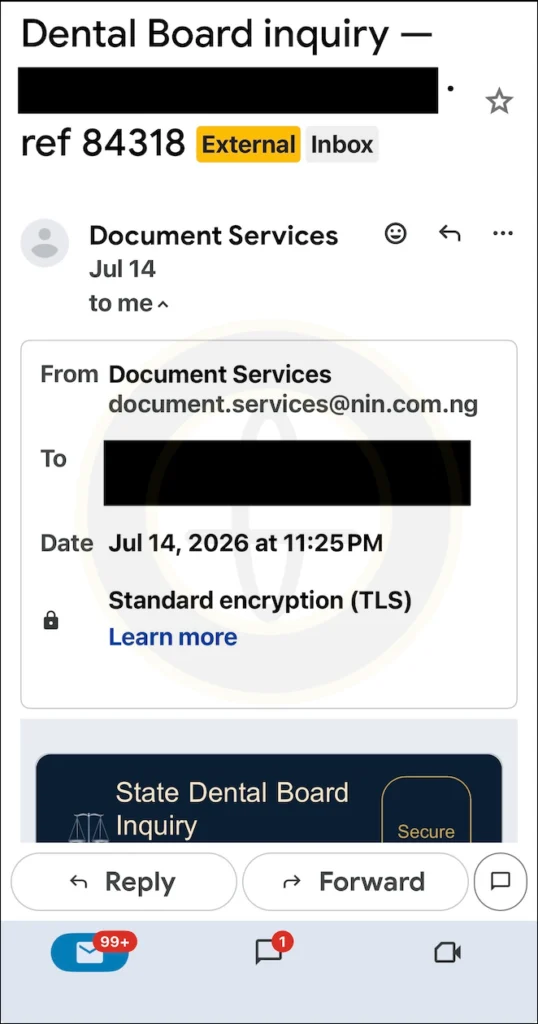
An email arrives with the subject line "Dental Board inquiry – [practice name] ref 84318”. The body of the email looks professionally stylized, claims that information has been updated, and requires a log-in to confirm the information. It includes a button to a “secure portal”. However, it’s a fake designed to steal username and password, giving attackers direct access.
The “Unverified Purchase” Scam
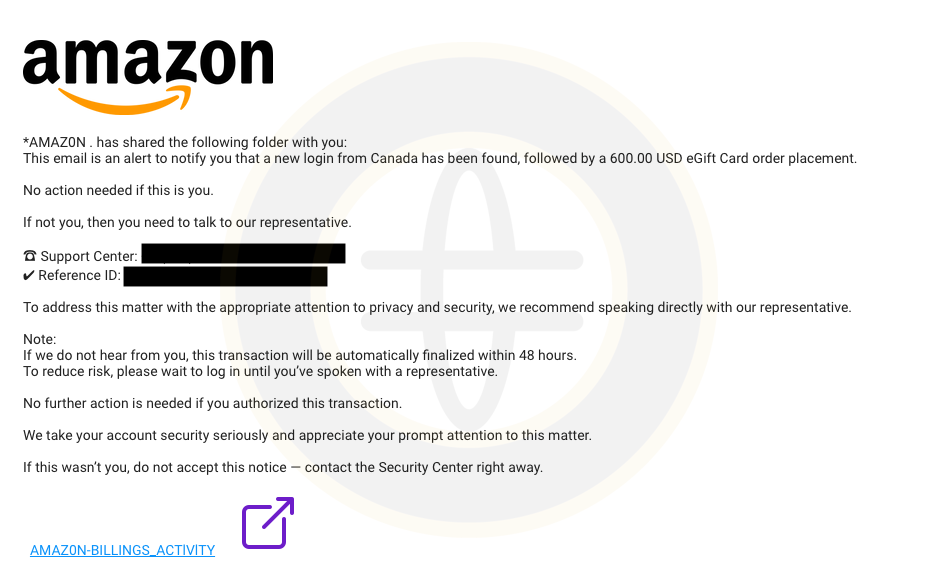
An email from “Amazon” hits a dental staff member’s inbox. The email alerts to a possible unverified purchase on the account, but insists the user contact a representative (via the phone number provided) and not to log into their account. It also provides a link to a shared folder where the user can view their Amazon billing activity. However, the link activates the download of malicious files.
The “Employee Banking Update” Scam
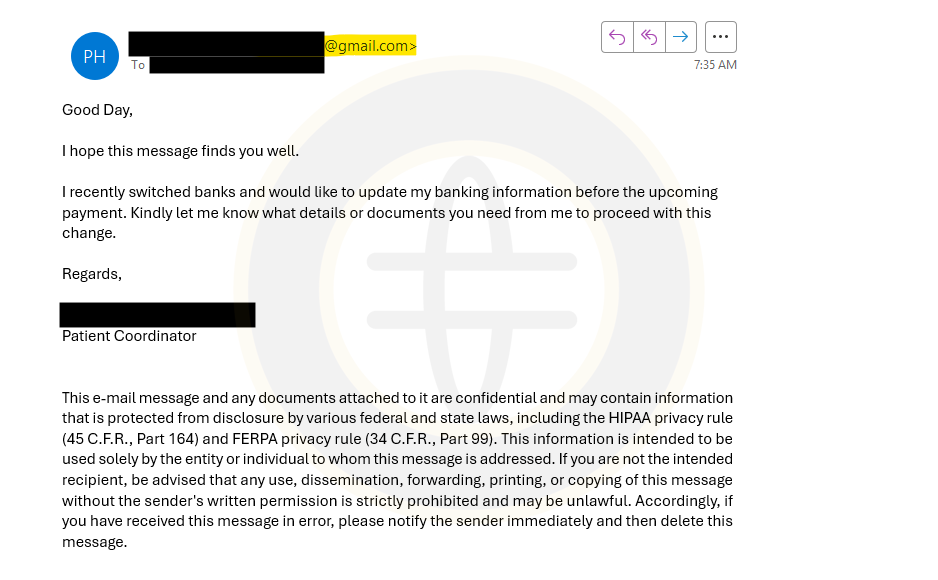
This email appears to come from a patient coordinator’s personal gmail account. The message states that they recently switched banks and need to update their banking information before upcoming payroll. They ask what details or documents are needed to proceed. The goal is to get a response which allows them to send requested details or documents (via link or attachments) and causing team member to click without thinking and inadvertently download malware. This is a type of business email compromise.
The Fake “Back-and-Forth Switch” Scam
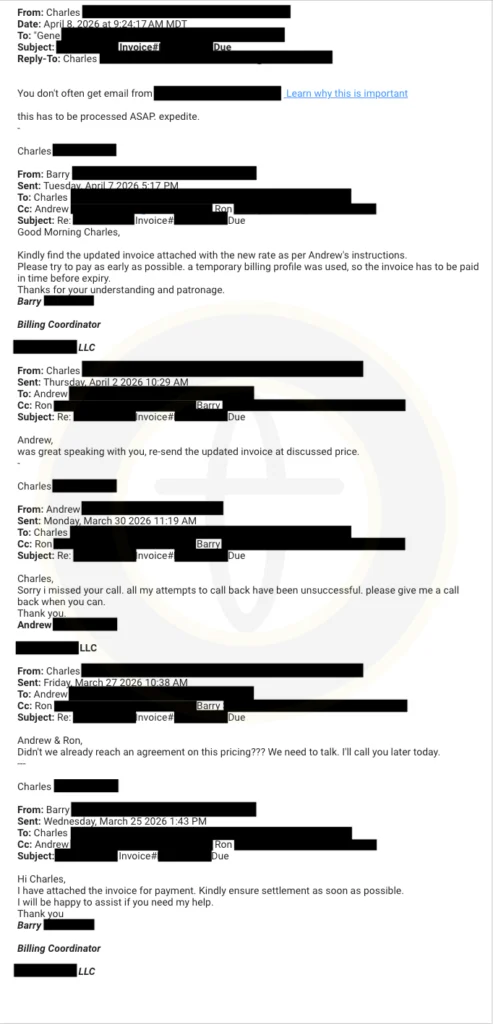
This attack is particularly cunning. An email forwarded from the doctor that instructs a dental team member to “proceed ASAP expedite”. The email shows a back-and-forth thread between the doctor (displaying their actual email address) and a vendor. But here’s the kicker… the forwarded email from the doctor shows a different email address and they’ve used a tricky sentence at the top “you don’t often get email from [email address]” with a linked “learn why this is important”. Outlook’s own version of that notice appears above the message, not inside it, so this one is part of the bait. Clicking the link initiates the download of ransomware, which can lock down an entire network, including patient charts, schedules, and imaging files.
The Four Examples at a Glance
| Example | Pretends to be | Asks you to | Red flags | Right response |
|---|---|---|---|---|
| State Dental Board Inquiry | The dental board | Log in to a "secure portal" | Sender domain unrelated to any dental board; generic "Document Services" name | Don't click. Go to the board's real website yourself, and report the email. |
| Unverified purchase | Amazon | Call a number and open a billing folder | Misspelled "AMAZ0N"; 48-hour pressure; link to a shared folder | Don't call or click. Report it and check your account directly. |
| Employee banking update | A coworker | Send new banking details before payroll | Personal Gmail address; payment change request | Confirm in person or by phone using a number you already have, then report it. |
| Back-and-forth switch | The doctor and a vendor | Pay an invoice ASAP | Different sender address; fake "learn why this is important" notice in the body | Check with the doctor in person or by phone. Don't click. Report it. |
How Do You Spot a Phishing Email? 5 Red Flags for Dental Teams
Training your team to be vigilant is the most powerful first step you can take. Here are five critical red flags that can help anyone spot a phishing email in seconds. For a deeper look at each sign, see our guide to the five signs of a phishing email.
- Mismatched Sender Email Addresses: This is the easiest and most common giveaway. A hacker can make an email look like it's from your dental supplier in the display name, but the actual email address might be something like support@secure-login-portal.com or a random string of characters. Always hover your mouse over the sender's name to reveal the true email address before trusting it. On a phone, tap and hold the sender’s name instead. Generic greetings like “Dear User” are another clue, though many attacks now use your real name.
- Urgent or Threatening Language: Phishing emails thrive on creating a sense of panic. They use phrases like "Immediate Action Required," "Your Account Will Be Suspended," or "Urgent Security Alert." This is a psychological trick designed to make you act before you think. Legitimate organizations rarely use such high-pressure tactics.
- Suspicious Links and Attachments: Never click a link or download an attachment from an unexpected email. As with the sender's address, you can hover your mouse over a link to see the actual URL it leads to. If the destination URL looks strange or doesn't match the context of the email, do not click it. Be especially wary of attachments like invoices, faxes, or scanned documents you weren't expecting.
- Requests to Change Payment or Banking Details: Be wary of any email that asks you to update bank details, pay an invoice “ASAP”, or call a number listed in the message. Three of the four examples above work this way. Confirm by calling the person at a number you already have, never one from the email.
- Requests for Sensitive Information: This is the ultimate red flag. No legitimate company (not your bank, your software provider, and certainly not a government agency like the IRS) will ever ask you to provide a password, credit card number, or other sensitive credentials via email. The goal of a phishing attack is to steal this information, so any email asking for it is almost certainly a scam. It's a critical component to protect patient data at all costs.
Your 5-Minute Phishing Training Script for Morning Huddles
Effective dental practice cybersecurity training doesn't require a full-day seminar. Consistent, brief reminders are far more effective. Here is a literal, copy-and-paste script you can use in your next morning huddle to drive the point home.
(Start of Script)
- Introduction (30s): "Team, today's security minute is on phishing. Phishing emails are scam messages designed to steal our login information or patient data. They are a major threat to our practice, but they are easy to spot if we know what to look for."
- The #1 Rule (1 min): "The number one rule is this: Think Before You Click. If an email is unexpected, from someone you don't know, or just feels 'off,' I want you to stop for a second. Rushing is how mistakes happen. Ask yourself: Was I expecting this email?"
- Quick Red Flags (2 mins): "Here are the top things to look for. First, check the sender's email address by hovering over it—does it look legitimate? Second, be suspicious of any email that creates a sense of panic or urgency. Third, never click on suspicious links or download unexpected attachments. Finally, we will never be asked for passwords over email. That is a huge red flag. Also, treat any request to change banking details or pay a rush invoice as suspicious until we confirm it by phone.”
- What to Do (1 min): "If you see an email like this, do not click and do not reply. Don’t forward it to coworkers; send it to me [or your IT contact] right away. If a message asks for money or banking changes, call the person using a number you already have. If you already clicked, tell me right away. Even if you’re not sure, it’s always better to be safe. You will never be in trouble for reporting a suspicious email.”
- Closing (30s): "This simple habit of being cautious protects our patients, our practice, and all of our jobs. Thank you for making security a priority."
(End of Script)
What Should Staff Do If They Click a Phishing Link?
Clicking a bad link is not the end of the world, as long as your team acts fast. Share these steps at your next huddle:
- Stop. Don’t enter anything else or reply.
- Tell your IT contact right away, even if you’re not sure if was a problem.
- Disconnect from the network if you can. Unplug the Ethernet cable or turn off Wi-Fi, then follow your IT provider’s instructions.
- Keep the email. Don’t delete it. IT needs it to trace what happened.
- Change any password you entered, from a different device, as IT directs.
- Write down what happened: the time, what was clicked, and what was entered. Your compliance advisor can help decide whether breach notification applies.
Beyond Training: How Pact-One Strengthens Your Practice
Staff training is a critical first step, but the best defense is a proactive one. General IT providers don't understand the unique software and compliance pressures of a dental practice. Pact-One has served only dental practices since 2003. Our dental IT support team has seen these exact phishing tactics and builds defenses against them. While your team becomes your human firewall, we build the technological one that works to detect and stops threats in their tracks.
Proactive Email Security for Dental Offices
The best defense is keeping phishing emails out of the inbox in the first place. Pact-One offers advanced email security with filters that analyze incoming messages for malicious links, attachments, and sender spoofing. Filtering helps stop many phishing emails before they reach an inbox, so your team sees fewer of them. Not sure what you’re using today? Here’s how to check in 10 minutes.
Comprehensive Cybersecurity that Understands HIPAA
HIPAA compliance takes ongoing work. Our security services are designed with HIPAA in mind, helping you protect patient data and support your HIPAA compliance. We understand how PHI is handled in a dental practice and build your protections around it, turning a major source of stress into a point of strength. Wondering where the HIPAA Security Rule stands? Here’s the 2026 update.
Make Cyber Liability Insurance Easier to Get and Keep
Cyber insurance applications now read like audits. Carriers ask whether:
- Multi-factor authentication is on
- Every device is monitored for threats
- Your backups are protected and tested
- Your team gets regular phishing training
Pact-One helps you put those protections in place and keep them running, so renewal time isn’t a scramble. Your carrier sets your premium, and no IT company can promise a lower rate. But closing these gaps puts you in a stronger position to qualify and renew.
24/7 Monitoring: Your IT Partner is Always on Watch
From reactive to proactive—that’s the Pact-One philosophy. We don’t just fix problems; we prevent them. Our team provides 24/7/365 network monitoring through Managed Detection & Response (MDR), a security operations center that detects and responds to suspicious activity in real time. While you’re focused on your patients, we’re focused on your network's health and security, acting as your dedicated IT partner that is always on watch.
Secure Your Dental Practice Today
Vigilance is crucial, but having a dedicated partner who lives and breathes dental IT is the ultimate safeguard. You don't have to face the growing threat of cyberattacks alone. By combining team education with professional, proactive security measures, you can build a truly resilient practice.
Not sure where your practice stands? Schedule a free consultation with a Pact-One dental IT specialist today. We'll help you identify your biggest risks and provide actionable recommendations.
Dental Office Phishing: Frequently Asked Questions
What is phishing in a dental office?
Phishing is a scam email, text, or call that tricks someone into clicking a link, opening a file, or sharing a password. In a dental office, the message often looks like it comes from a software vendor, the dental board, supplier, coworker, or a referring practice. One click can expose patient records and take your network down.
How can my team spot a phishing email?
Look for five red flags: a sender address that doesn’t match the name, urgent or threatening language, unexpected links or attachments, a generic greeting, and any request for passwords or payment details. When in doubt, don’t click. Report it to your IT contact, and confirm with the sender using a phone number you already have.
What should staff do if they click a phishing link?
Report it to your IT provider right away, and, if you can, disconnect the computer from the network by unplugging the Ethernet cable or turning off Wi-Fi. Don’t delete the email or try to fix it alone. Your IT team can check the device and reset any exposed passwords. Fast reporting limits the damage, so make it safe to speak up.
Does HIPAA require phishing training for dental staff?
The HIPAA Security Rule requires a security awareness and training program for all workforce members, including management. HHS’s Office of Civil Rights points to phishing recognition and a clear reporting process as part of that training, and says it should be ongoing, not a one-time event. Check with your compliance advisor for what applies to your practice.
How often should dental teams do phishing training?
Short or often works best. A five-minute huddle reminder each month, plus a more formal refresher at least once a year, keeps phishing top of mind. Keep a simple sign-in sheet. HIPAA risk assessments and cyber insurance applications may both ask for proof that training happened.
Can email filtering stop every phishing attempt?
No. Filters catch a lot, but no tool catches everything. That’s why the strongest defense is layered: email security that screens messages, monitoring that spots suspicious activity, backups that protect your data, and a trained team that knows to pause and report.
Similar Articles
- How to Spot Phishing Scams: 5 Signs Dental Practices Should Look Out For
- Defending Your Dental Practice Against Phishing Scams
- Is My Dental Office’s Email Secure? (And How to Tell What You’re Using in 10 Minutes)
- Is the HIPAA Security Rule Final in 2026? Here’s What Dental Practices Need to Know
Dental IT, Be Worry-Free
Pact-One takes IT completely off your plate – cybersecurity, data backup & recovery, and day-to-day support – so you can get back to running your practice. Dental IT exclusively since 2003.
Whether you’re looking for dental IT services for your startup or searching for more responsive dental IT support – our team of dental IT specialists have you covered. With team members throughout the United States, we offer nationwide support to dental practices of all sizes, specialties, and stages of growth. Our wide range of dental IT services ensure your data is secure, accessible, and protected.
Don't let technology challenges hinder your ability to deliver exceptional dental care. Contact us at info@pact-one.com or 866-722-8663 to join over 3,000 dental professionals thriving with the support of a dedicated dental IT team.
Sources:
- Adler, S. (2026, October 15). Healthcare Data Breach Statistics – Updated for 2026. HIPAA Journal. https://www.hipaajournal.com/healthcare-data-breach-statistics/
- Office for Civil Rights. (2026, September 17). HHS’ Office for Civil Rights Settles HIPAA Investigation of Ambry Genetics Phishing Attack Affecting 225,000 Individuals. U.S. Department of Health and Human Services. https://www.hhs.gov/press-room/hhs-office-civil-rights-settles-hipaa-investigation-ambry-genetics-phishing-attack-affecting-225000-individuals.html
- Office of Civil Rights. (2024, October 25). October 2024 OCR Cybersecurity Newsletter. U.S. Department of Health and Human Services. https://www.hhs.gov/hipaa/for-professionals/security/guidance/cybersecurity-newsletter-october-2024/index.html

You must be logged in to post a comment.